
You have probably used cloud storage today without even thinking about it. Every photo backed up from your phone, every document saved automatically to Google Drive, every email attachment stored in Gmail. This guide breaks down exactly what cloud storage is, where it lives, how it works, and which provider matches your needs. No marketing hype. Just facts.
What is Cloud Storage
Cloud storage refers to saving data to offsite storage managed by a third-party provider, accessed over the public internet or a dedicated private network connection. Traditional methods like saving to an external storage device or on-premises storage keep files physically near you. Cloud computing changes that equation entirely.
The shift from capital costs vs. operating expense is fundamental here. Buying your own servers means upfront hardware expenses, cooling, electricity, and IT staff. Cloud service provider (CSP) models turn those purchases into monthly operational bills. You stop guessing capacity. You stop buying for peak demand.
Core characteristics of cloud storage
- Elasticity;
- Remote access;
- Durability;
- Automated management.
Unstructured data like videos, photos, and PDFs make up most of the world’s information. Cloud storage handles these files without forcing you to organize them into rigid folders.
Metadata does the heavy lifting tagging everything with dates, locations, file types, and custom labels.
Data backup becomes automatic. Disaster recovery shifts from “maybe we’ll survive” to “we have three copies in two different regions.” Off-premises backup protects against fire, flood, theft, or simple hardware failure. A $50 hard drive can die. A data center with redundant power and climate control costs millions to build. You rent access instead.
Where is Cloud Storage Located
Your files sit on servers inside massive data centers. These are not magic clouds. They are buildings filled with hard disk drives, cooling systems, backup generators, and fiber optic connections. Google Cloud operates data centers in Iowa, Belgium, Singapore, and dozens of other locations. For a complete, up-to-date list of global infrastructure locations, you can refer to providers like SiteGround’s Data Center Map, which shows how CDN edge locations are distributed worldwide. Microsoft Azure has over 60 regions worldwide.
Storage nodes spread data across multiple physical machines. When you upload a file, the CSP breaks it into pieces called shards. Each shard goes to a different server. Some copies go to a different city entirely. A fire in one building does nothing. A power outage in one state still leaves your data accessible from somewhere else.
Where your data actually lives
| Location Type | Examples | Purpose |
|---|---|---|
| Regional data centers | Northern Virginia, Ireland, Tokyo | Primary storage for low latency |
| Availability zones | Multiple facilities within a region | Redundancy without cross region delay |
| Edge locations | 200+ cities worldwide | Caching for fast content delivery |
Virtual private clouds (VPCs) give you isolation inside public infrastructure. Your data travels through dedicated logical networks. Other customers on the same physical hardware cannot see your traffic. Compliance requirements for finance and healthcare often demand this separation.
Edge servers in a content delivery network (CDN) cache copies of your files closer to users. A customer in Tokyo downloads from a Tokyo server, not from Virginia. Streaming companies like Netflix and Hulu rely on this architecture. Without edge caching, video playback would buffer constantly.
Pros and Cons of Cloud Storage
Pros:
- Elasticity means you scale up during holiday sales and scale down in February. No wasted capacity;
- Access from anywhere with an internet connection. Remote workforce teams collaborate across continents;
- Automated backups run on schedules. You never forget to copy files to an external storage device;
- Data encryption protects data in motion and at rest. AI-powered data encryption now detects unusual access patterns;
- Shared responsibility model splits security duties. CSP secures the physical data center. You manage access control and user authentication.
Cons:
- Data transfer fees apply when moving large volumes out of a provider’s network. Egress charges surprise many small businesses (see the AWS S3 Glacier pricing page for examples of retrieval and transfer costs);
- Latency kills performance for certain workloads. Video editing from cloud storage works poorly compared to local drives;
- Compliance tools help with regulations like HIPAA and GDPR, but you still do the paperwork. Mistakes fall on you;
- Cost per gigabyte looks cheap until you store petabytes. Cloud cost optimization becomes a full time job at scale. Research shows enterprises waste an estimated 30-32% of cloud spend, totaling $200-230 billion annually. For strategies to combat this, look into FinOps practices for cost optimization;
- Vendor lock in makes switching painful. Moving 500 terabytes from AWS to Google Cloud takes weeks and expensive bandwidth.
When Cloud Storage Makes Sense
Choose cloud storage when:
- Your team works from multiple locations;
- You need automated backups without manual effort;
- Your storage needs grow unpredictably;
- You lack dedicated IT staff for hardware maintenance.
Avoid cloud storage when:
- You work with very large files that need local editing (4K video, CAD);
- Your internet connection is slow or unreliable;
- Strict data sovereignty laws conflict with provider regions;
- You have predictable, stable capacity needs for many years.
A small business might love the simplicity. A large enterprise with testing and development environments might struggle with unpredictable bills (a concept known as Shadow IT when employees use unauthorized services).
Neither is wrong. Use cases matter more than features.
Types of Cloud Storage Architecture
Not all cloud storage works the same way. The architecture you choose determines how fast your data retrieves, how much you pay, and what kinds of applications can use it effectively.
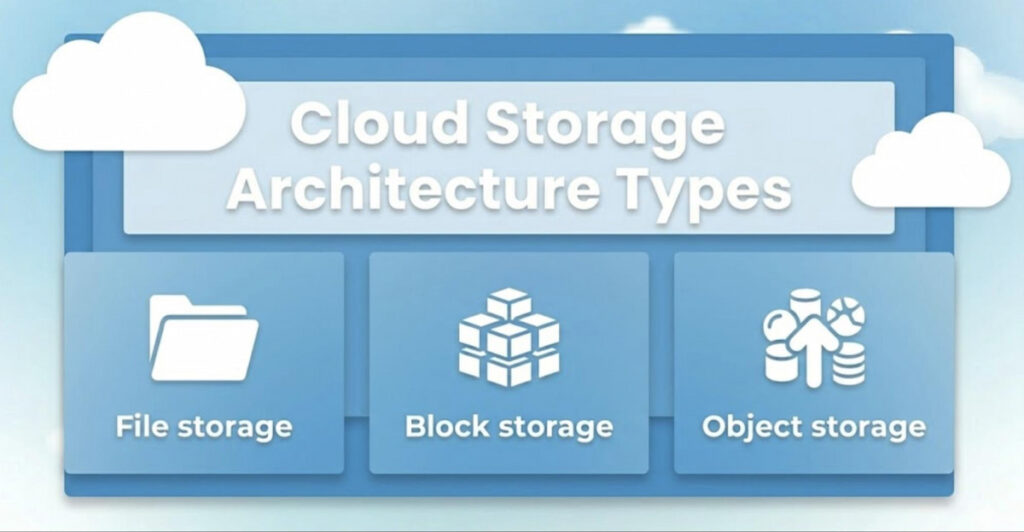
Three major storage types dominate the market today, each built for different workloads and access patterns. Understanding the differences between them saves you from overpaying for performance you do not need or suffering through slow access because you picked the wrong option.
File storage
File storage organizes data in a hierarchy. Folders contain files. Files contain data. This feels familiar because your laptop works the same way. Network attached storage (NAS) devices use this model where multiple computers share the same folder structure over a network.
This approach works well for home offices and small teams, but it does not scale efficiently to millions of files. Navigating deep folder trees becomes slow when you have hundreds of thousands of directories.
Block storage
Block storage chops data into fixed size blocks, and each block receives its own unique address. The servers decide where to reassemble everything when a user or application requests the data.
This is what happens when you attach a virtual hard drive to a cloud VPS running in the cloud. Databases love block storage because it offers extremely low latency and high throughput for transactional workloads. Think of block storage as LEGO bricks that can be arranged in any order, compared to file storage which is more like a completed castle with fixed rooms and hallways.
Object storage
Object storage treats each file as a complete, self contained object rather than splitting it across a folder hierarchy, which means there are no nested directories or complex path structures to navigate. Each file comes packaged with its descriptive metadata and a unique identifier, allowing the system to locate and retrieve it without knowing any folder name or parent directory.
Storage nodes distribute objects across hundreds or thousands of drives in parallel. Amazon Web Services (AWS) S3 is the classic example of object storage at scale. This flat structure eliminates the performance bottlenecks that come from traversing deeply nested folders, making object storage ideal for web applications, backup systems, and big data analytics where massive volumes of unstructured data need to be stored and retrieved efficiently.
Deployment models explained
Private cloud runs on infrastructure you own, either in your own data center or on dedicated hardware leased from a provider. Public cloud runs on shared infrastructure where multiple customers use the same physical equipment but cannot see each other’s data.
Hybrid cloud mixes both approaches. A hospital might keep patient records on a private cloud for compliance reasons while running analytics workloads on a public cloud because the computational demands fluctuate unpredictably.
Multicloud means using AWS for storage, IBM Cloud® for artificial intelligence, and Microsoft Azure for databases, selecting the best tool from each provider rather than committing to a single vendor.
Virtual private clouds add network isolation within public infrastructure. Your VPC cannot see another customer’s VPC even though both run on the same physical hardware. This gives you the security benefits of a private environment without the capital expense of building your own data center.
Storage type comparison
| Storage Type | Structure | Best For | Latency |
|---|---|---|---|
| File storage | Folders and files | Home directories, shared drives | Moderate |
| Block storage | Fixed size blocks | Databases, virtual machines | Very low |
| Object storage | Flat namespace with metadata | Web content, backups, analytics | Higher |
How Does Cloud Storage Work
You upload a file through a web portal, website, or mobile app. The CSP’s application programming interface (API) receives the data. APIs are just rules machines follow to talk to each other. Your phone uses an API. Your laptop uses an API. Smart fridges use APIs.
The CSP encrypts your file. Data encryption happens automatically with modern providers. Some offer customer controlled keys where only you hold the decryption password. Data in motion stays encrypted across the public internet. A virtual private network (VPN) adds another layer of protection, though not always necessary.
Step by step upload process
- Your device breaks the file into smaller chunks;
- Each chunk gets encrypted with a unique key;
- Chunks are distributed across multiple storage nodes;
- Metadata records where each chunk resides;
- Additional copies are written to other availability zones;
- The original local file can be deleted or retained.
The system breaks your file into chunks. Each chunk goes to a different physical server. Servers might be virtual servers/VMs running on shared hardware. Your file exists nowhere and everywhere simultaneously. No single drive holds the complete picture.
Storage area networks (SANs) connect groups of servers to shared pools of hard disk drives and SSDs. This lets any server access storage from any drive. Performance improves dramatically because no single drive becomes a bottleneck.
When you request the file later, the CSP pulls chunks from multiple storage nodes. Those nodes might be in different rows, different rooms, or different states. The system reassembles everything, verifies integrity, and sends the file to you. All this happens in seconds because data centers use content delivery network (CDN) caching for frequent requests.
Key technical components
- Physical server;
- Hard disk drives;
- Storage nodes;
- API endpoints.
Lifecycle controls automate movement between storage tiers. Hot data stays on fast SSDs. Cool data moves to cheaper hard drives. Cold archival data moves to tape or very slow disks. Immutable retention policies prevent deletion during compliance periods. A financial firm cannot accidentally delete audit records from seven years ago.
File syncing keeps the same version across multiple devices. Change a document on your phone. Your laptop gets the update within minutes. Real-time collaboration means two people edit the same spreadsheet simultaneously. Google Docs showed this was possible. Now every major provider offers similar features.
How to Use Cloud Storage
To get started, you need to sign up for an account, and most providers offer free tiers that let you test their service without spending money. Google Cloud gives you 15 GB shared across Gmail, Drive, and Photos, while Microsoft Azure and AWS focus more on enterprise customers but still provide limited free storage for small scale testing. TerabBox cloud storage markets heavily to individual users who want large capacities at low prices, making it a popular choice for personal backups rather than business use.
After creating your account, install the desktop or mobile application, then drag files into the sync folder which behaves exactly like any other folder on your computer. If you delete something from that local folder, the system removes it from the cloud as well unless you have configured archive rules to retain deleted items separately. Many new users lose data this way because they assume deleting locally keeps the cloud copy intact, so always verify your provider’s sync behavior before removing anything important.
Basic setup checklist
- Create account with chosen provider;
- Verify email and set up two factor authentication;
- Download desktop and mobile apps;
- Choose which folders to sync continuously;
- Configure backup schedules for non synced folders;
- Set sharing defaults (private, link only, public).
Configure automated backups for specific folders. Your Documents folder, your Desktop, your Photos library. Set schedules daily or continuously. Off-premises backup saves you when ransomware encrypts your local drive. Restore from a snapshot taken yesterday morning.
Share files through links. Set expiration dates and download limits. Require passwords for sensitive documents. Access control lists let you specify view only, comment, or edit permissions. A contractor sees only the three files you shared. No access to everything else.
Team collaboration tools integrate directly. Slack shows previews of shared cloud files. Microsoft Teams opens Word documents stored in OneDrive. Zoom allows co annotation on PDFs stored in the cloud. The tools disappear into your workflow.
Use mobile apps to capture receipts, scan business cards, or record whiteboards. The app uploads immediately. You never lose a handwritten note again. Sole proprietorships run entirely from phones this way.
Advanced usage patterns
For advanced users: connect API access to automate uploads. A security camera writes footage directly to cloud buckets. A server logs errors to cloud storage every minute. A testing and development environment spins up temporary storage for each code commit, then destroys everything when tests finish.
| Use Case | API Method | Frequency |
|---|---|---|
| App logs | Append to object | Every minute |
| User uploads | PUT object | On demand |
| Automated backups | Batch copy | Daily |
| Data processing | Range GET | Streaming |
How Much Does Cloud Storage Cost
Pricing follows pay-as-you-go models. You pay for stored capacity measured in gigabytes or terabytes per month. Cost per gigabyte drops dramatically at volume. Personal users might pay $0.02 per GB monthly. Enterprises storing petabytes pay fractions of a cent.
Data transfer fees apply to downloads. Uploads are usually free. Moving 10 TB out of AWS to another provider might cost $900. Moving the same data within AWS regions costs nothing. For a detailed comparison of egress fees across AWS, Azure, and Google Cloud, see this multi-cloud cost analysis.
On-demand, reserved, spot instances apply to block storage attached to virtual machines. On demand means pay by the hour. Reserved means commit to one year for 40% discount. Spot instances bid on unused capacity, up to 90% off but can be terminated without warning.
Pricing components to watch
- Stored capacity;
- Data transfer out;
- API requests;
- Retrieval fees;
- Data replication.
Cloud cost optimization involves watching these variables carefully. FinOps (finance + DevOps) teams emerged specifically to manage cloud spending.
Teams often use dashboards and a pie chart creator to visualize storage costs, data transfer fees, and spending trends across different cloud services. Establishing clear budget thresholds and automated alerts within these dashboards ensures that unexpected cost spikes are caught early before they escalate into significant overruns.
A forgotten development storage volume might run for months costing thousands. Automated policies delete unused resources after 30 days.
Let’s examine specific providers.
Google cloud storage
Google Cloud offers Standard, Nearline, Coldline, and Archive storage classes. Standard for active data costs about $0.020 per GB monthly. Archive for data accessed once per year costs $0.0012 per GB. Retrieval fees increase for colder tiers. Retrieving 1 TB from Archive costs roughly $50. Big data analytics and machine learning (ML) workflows integrate natively. Artificial intelligence (AI) models train directly on stored data without moving files.
TerabBox cloud storage
TerabBox targets individual users with large storage needs. Plans often advertise 1 TB to 10 TB at flat monthly rates around $5 to $10. Read the fine print on upload and download speeds. Some budget providers throttle connections after certain usage. File sharing works but lacks enterprise security features like endpoint protection and threat analysis. Fine for personal photo backups. Bad for healthcare or government services.
Microsoft cloud storage
Microsoft Azure storage includes Blob (object), File, Queue, and Table storage. OneDrive integrates with Windows, Office, and Teams. Microsoft 365 subscriptions include 1 TB per user. Large enterprises use Azure File Sync to extend on premises file servers into the cloud. Content and email filtering applies to shared files automatically. Compliance tools meet data privacy and archival regulations for finance and healthcare.
Adobe cloud storage
Adobe cloud storage comes bundled with Creative Cloud subscriptions. 100 GB included. Upgrading to more storage costs extra per month. The value is tight integration with Photoshop, Premiere Pro, and After Effects. Save a file on your desktop. Open the same file on the tablet with full layers and history intact. Deep learning workflows for generative AI features like Firefly require Adobe’s storage. Third party cloud storage breaks those features.
Amazon cloud storage
Amazon Web Services (AWS) dominates enterprise cloud storage. S3 (Simple Storage Service) started in 2006 and remains the industry benchmark. Storage classes include S3 Standard, Intelligent Tiering, Glacier Instant Retrieval, Glacier Flexible Retrieval, and Glacier Deep Archive. The cheapest tier costs $0.00099 per GB monthly. Retrieval takes 12 to 48 hours. Streaming companies like Netflix store massive video libraries on S3. Energy companies store seismic data. Manufacturing firms store CAD files and sensor logs.
Amazon Drive (consumer product) shut down in 2023. Consumer photos now go to Amazon Photos included with Prime membership. Unlimited photo storage, 5 GB for videos. Not the same as AWS business offerings.
Provider pricing summary
| Provider | Free Tier | Entry Paid Tier | Best For |
|---|---|---|---|
| Google Cloud | 15 GB | $0.02/GB month | Analytics, AI workloads |
| TerabBox | 10 GB | $5 for 1 TB month | Personal backups |
| Microsoft Azure | 5 GB | $0.018/GB month | Windows integration |
| Adobe | 2 GB | Included with CC | Creative professionals |
| AWS | 5 GB | $0.023/GB month | Enterprise, scaling |
How to Choose Cloud Storage
Start with your data volume. Under 1 TB? Almost any provider works. Over 100 TB? You need enterprise features.
Selection criteria checklist:
- Data volume;
- Access frequency;
- Security requirements;
- Integration needs;
- Team size;
- Geographic reach;
- Budget constraints.
Common mistakes to avoid:
- Choosing a provider solely based on lowest per GB price without calculating total cost;
- Forgetting to account for data transfer fees on downloads;
- Ignoring retrieval costs for archive tiers;
- Not setting up lifecycle policies for automatic tier transitions.
Integration matters more than features. Already using Microsoft 365? OneDrive makes sense. Running big data analytics on Google Cloud? Use their storage.
Data residency is critical for compliance. If you operate in the EU or handle financial data, you must know where your servers are located. Microsoft provides documentation on data residency for Office 365 to help with GDPR compliance. For healthcare, strict rules apply regarding electronic Protected Health Information (ePHI). Providers like Nebius outline the shared responsibility model for HIPAA compliance, clarifying that while the infrastructure may be compliant, the customer is responsible for configuring access controls correctly.
Cloud Storage Use Cases
Data backup and disaster recovery remains the most common use. Automated daily backups to offsite storage protect against local failures. Immutable retention policies prevent ransomware from encrypting backups. Restore entire systems in hours instead of weeks.
Team collaboration for remote workforce depends entirely on cloud storage. Ten people edit the same proposal. Changes sync instantly. Comment threads live beside content. Version history recovers any previous state. No emailing attachments back and forth.
Use case by industry
| Industry | Primary Use | Secondary Use |
|---|---|---|
| Finance | Audit trails, transaction logs | Disaster recovery, compliance |
| Healthcare | Medical imaging, patient records | Research data, backups |
| Energy | Seismic data, sensor logs | Archival, analytics |
| Government | Public records, citizen services | Secure document storage |
| Manufacturing | CAD files, quality reports | Supply chain data |
| Retail | Inventory data, customer profiles | Point of sale backups |
Testing and development environments need temporary storage for each build. Spin up 100 TB of block storage. Run tests for two hours. Destroy everything. Pay only for those hours. Capital costs vs. operating expense makes this possible. Buying physical servers for transient workloads wastes money.
Archiving replaces tapes and external drives. Data archiving with automated policies moves old projects to cheap cold storage. Search metadata to find specific files without restoring entire archives. Energy companies keep well logs for decades. Manufacturing firms keep design files forever.
Big data analytics feeds artificial intelligence and machine learning models. Object storage holds petabytes of training data. Deep learning workflows read data directly from cloud buckets. No copying to local SSDs first. Models train faster. Costs stay predictable.
Content distribution for streaming companies uses CDNs and edge servers. Netflix stores mastered videos in cloud storage. Edge servers cache popular titles near users. Less popular titles retrieve from cold storage when requested. Hybrid approach reduces costs while maintaining performance.
Healthcare providers store medical images, patient records, and research data. Compliance tools enforce HIPAA controls. Audit logs track every access. Data encryption meets legal requirements. On premises storage cannot match this compliance automation.
Government services use private clouds and VPCs for sensitive data. Public records might go to the public cloud. Classified information stays on dedicated infrastructure. Hybrid models balance security and cost.
Emerging use cases
- AI training datasets;
- Edge computing;
- Blockchain backups;
- Genomic sequencing.
Finance firms trade milliseconds matter. Hot storage for active market data. Cold storage for audit trails required to be kept for seven years. Immutable retention policies satisfy regulators. Delete protection prevents accidental or malicious erasure.
Retail companies store inventory data, customer profiles, and sales history. Seasonal peaks demand elasticity. Black Friday traffic uses 10x normal storage. January sales drop back down. Pay only for what you use each month.
Small business owners run entire operations from cloud storage. Receipts, contracts, invoices, marketing materials. Sole proprietorships spend nothing beyond monthly subscription fees. No IT department required. No backup strategy to design.
Large enterprises manage thousands of teams across continents. Multicloud strategies avoid vendor lock in. Workloads run on the best provider for each task. Storage aggregates across AWS, Azure, and Google Cloud. Complex but possible with proper tooling.
Cloud storage is not magic. It is not always cheaper. It is not always faster. But for most organizations, the flexibility, durability, and accessibility outweigh the costs. Choose your provider based on real workloads, not marketing comparisons. Test before committing. Monitor after deploying. Cloud computing rewards attention to detail. Ignorance gets expensive quickly.

