
You wake up. Coffee in hand. Then the phone blows up. Customers can’t reach your store. Partners see a scary browser warning. Someone forgot to renew a certificate. Again. That sinking feeling costs money. Maybe thousands per minute. We think there’s a better way. Actually, there is. It’s called SSL certificate monitoring, and it’s less boring than it sounds.
What Is SSL Certificate Monitoring
SSL certificate monitoring means automatically checking your certificates on a schedule. The system looks at expiration dates, trust chains, and revocation status. Then it screams for help when something smells wrong.
Why not just mark a calendar? Because certificates expire at 2 AM, because a single dev leaves the company. Because someone installs a test cert in production. Manual tracking fails. Monitoring tools send alerts before disaster hits.
Here’s what a decent monitoring setup checks:
- Expiration date (obvious but critical);
- Certificate chain completeness;
- Revocation status via OCSP or CRL;
- Domain name mismatch;
- Signature algorithm strength.
A proper monitoring setup doesn’t just look at expiration dates. It checks the entire chain of trust, from your domain’s certificate up to the root certificate stored in browsers. It flags problems like mismatched domain names, weak encryption algorithms, or certificates that were issued by an authority your browser no longer trusts.
Some solutions will even test from multiple geographic locations, because a certificate that works in New York might fail in Tokyo due to regional caching or CDN weirdness. We think that’s where most teams get burned, honestly. They assume if it works locally, it works everywhere.
What is an SSL Tracker
An SSL tracker is a more focused beast. While monitoring casts a wide net, a tracker zeroes in on the lifecycle of each certificate. You feed it a list of domains, maybe a few hundred or a few thousand, and it keeps a running log of issuance dates, renewal windows, and any changes to the certificate’s fingerprint. Trackers are great for large organizations with dozens of subdomains, wildcard certs, and third party services that each maintain their own SSL setup.
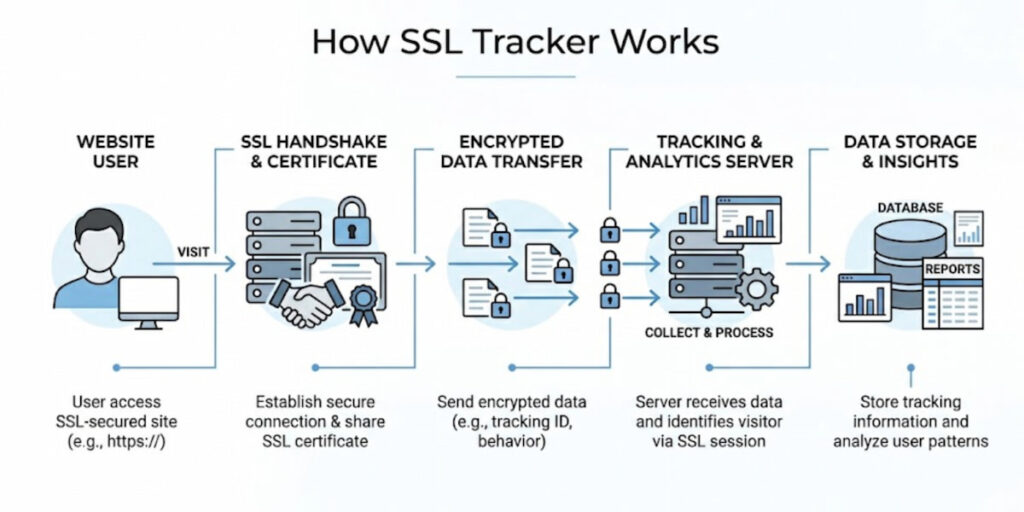
Picture this: your marketing team spins up a new landing page on a temporary domain. Someone generates a free Let’s Encrypt certificate. Three months later, nobody remembers. An SSL tracker would have logged that certificate the day it appeared and started a quiet countdown. When the renewal date approaches, you get a notification. No panic. No last minute firefighting.
Trackers often integrate with ticketing systems like Jira or ServiceNow, automatically creating tasks for the person whose name is on the cert. Some even show you historical trends, like how long each renewal took last quarter or which certificates are consistently renewed at the last possible second. That kind of data tells you where your processes are sloppy.
Why SSL Monitoring Matters
One word: trust. But not just user trust. Let’s break down exactly why you can’t afford to skip this.
- It prevents revenue loss from expired certificates. An expired certificate kills transactions instantly. Payment gateways refuse connections. Shopping carts error out. Subscription renewals fail. We’ve seen companies lose six figures in a single afternoon because one cert expired over a long weekend. No monitoring means no warning. No warning means angry customers and a frantic scramble to fix something that should have been renewed months ago;
- It protects your search engine rankings. Google demotes sites with invalid or expired certificates. That’s not a theory. It’s a documented policy. Drop out of the top results, and you’re not just losing sales. You’re losing discovery, traffic, and whatever momentum your marketing team worked so hard to build. Recovering from that kind of ranking hit takes weeks, sometimes months;
- It keeps internal systems running. Your CI/CD pipeline probably uses HTTPS for artifact downloads. Your monitoring tools might call internal APIs over TLS. Your database replication could depend on certificate based authentication. When one of those certs fails silently, everything downstream breaks. Developers get weird SSL errors. Deployments stall. Nobody connects the dots until someone checks the certificate manually, assuming anyone thinks to check at all;
- It catches configuration drift before customers do. Maybe a load balancer update changed your certificate chain. Maybe a new firewall rule blocks OCSP checking. Maybe a CDN started serving a cached, expired certificate from an edge node. Monitoring from multiple locations spots these inconsistencies immediately. Without it, you’re waiting for the first customer complaint to arrive via Twitter or support email. That’s not monitoring. That’s damage control;
- It helps you pass security audits. Compliance frameworks like PCI DSS, SOC 2, and ISO 27001 all require certificate management controls. Auditors want to see that you’re actively checking expiry dates, revocation status, and proper installation. A monitoring system gives you clean reports and timestamps. Spreadsheets and manual checks give you headaches and qualified opinions;
- It saves your on-call team from preventable pages. Nothing feels worse than getting woken up at 3 AM for an expired certificate. That’s not a real emergency. That’s a failure of the process. SSL monitoring puts those alerts where they belong: in a weekly review email or a low priority ticket, not in PagerDuty at 3 AM. Your engineers will thank you. Maybe not out loud, but definitely in their sleep schedules.
Honestly, the real reason SSL monitoring matters is simpler than all of this. The practice costs very little money and requires almost no ongoing effort, yet the alternative of skipping it is genuinely embarrassing for any professional team.
Letting a certificate expire sends a clear message that you haven’t covered your operational basics. Customers absolutely notice these failures, partners notice them too, and regulators have a habit of noticing them during audits. You really don’t want to be that team scrambling to explain an expired certificate to angry stakeholders.
How to Check If an SSL Certificate is Trusted
You can check whether an SSL certificate is trusted manually through your browser, but this process quickly becomes tedious with repeated use. Simply open your browser, click the padlock icon in the address bar, and open the certificate details. Both Chrome and Firefox allow you to view the full certificate chain, the issuing authority, and the validity period. Look for a clear message such as “This certificate is valid.” Make sure the domain name matches exactly. For example, a certificate issued for www.yourdomain.com will not cover yourdomain.com unless it is a wildcard certificate or both names are explicitly listed in the Subject Alternative Name field.
For a more technical verification, you can use the OpenSSL command line tool. Run the following command:
Bash
openssl s_client -connect yourdomain.com:443 -servername yourdomain.com
This command displays the complete certificate chain, the expiration date, and any verification errors. If you see “verify return code: 0 (ok)”, the certificate is properly trusted. Any other return code indicates a problem.
Another excellent option is SSL Labs’ online tool, commonly known as SSL Test. It provides a clear letter grade from A+ to F and thoroughly evaluates protocol support, cipher strength, and certificate trust paths. While the tool is free and very useful, remember that it only gives a snapshot at the time of testing. It is not suitable for ongoing monitoring.
Automated Certificate Checks
Most professional monitoring tools perform similar checks behind the scenes. They typically:
- Attempt a full TLS handshake;
- Validate the certificate chain against the system’s trusted root store;
- Compare the current date against the certificate’s notBefore and notAfter fields;
- Optionally test OCSP or CRL endpoints.
Checking revocation status is especially important. A certificate may appear perfectly valid according to its dates, but it can still be revoked by the issuer, making it untrusted in practice. Good monitoring solutions always verify this as well.
Top 5 SSL Certificate Monitoring Tools Compared
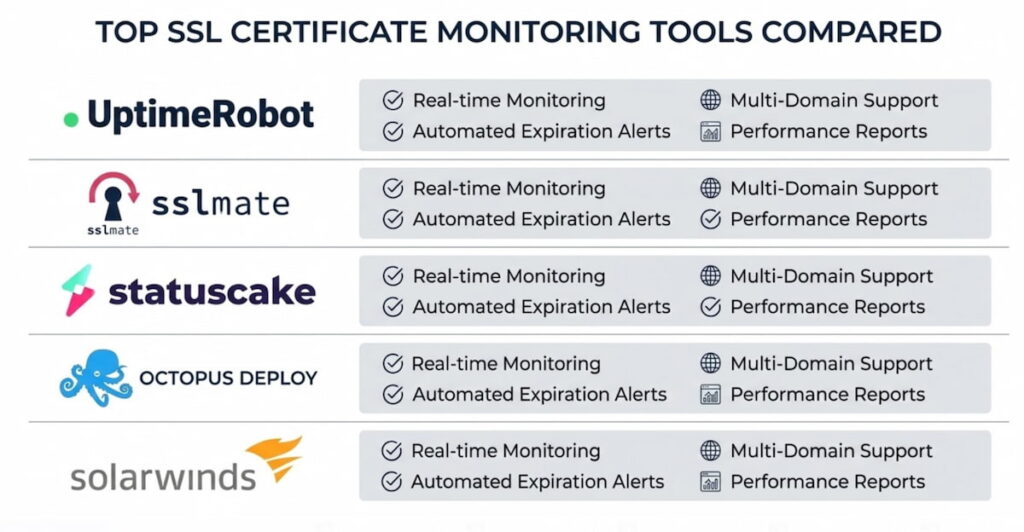
Let’s walk through the real players. This isn’t an exhaustive list, but it covers what most teams actually use.
1. UptimeRobot
UptimeRobot is a simple, inexpensive, and surprisingly effective SSL certificate monitoring tool. The free plan provides 50 monitors, each of which can check the expiration date of SSL certificates. You set a threshold, such as 30 days, and the program sends you an email when a certificate approaches that threshold. There are no complicated control panels. There’s no API for bulk importing. But for a small company with just a few domains, it simply works. Paid plans start at around $7 per month.
2. Sematext
Sematext is more geared toward the enterprise sector.It monitors SSL certificates as part of a larger observability stack. You get historical charts, alerting via Slack, PagerDuty, or webhooks, and the ability to correlate SSL issues with server load or latency spikes. The learning curve is steeper. You’ll spend an afternoon configuring thresholds and notification policies. Worth it if you already use Sematext for logs or metrics.
3. CertSpotter
CertSpotter is a service that monitors Certificate Transparency Logs, a public record of every SSL certificate issued anywhere in the world. Instead of checking your own servers, CertSpotter watches for new certificates that match your domain names.
That means you’ll know instantly if someone issues a fraudulent cert for your site. Free for basic use, paid for high volume or real time alerts. We think every company should run this alongside standard monitoring. It catches the stuff you didn’t know to look for.
4. SolarWinds
SolarWinds SSL is an expensive but powerful solution.It integrates with Active Directory and can automatically renew certificates from your internal CA. Best for Windows shops that run Exchange, SharePoint, or other Microsoft services. The interface looks like it’s from 2012, but the reporting engine is rock solid.
5. StatusCake
StatusCake is open source software and has endless flexibility.You write your own SSL checks using external scripts or the built in web monitoring. Zabbix won’t hold your hand. You’ll need to configure templates, triggers, and actions. But once it’s running, you can monitor thousands of certificates across dozens of environments. No per‑certificate licensing fees. Just your time and patience.
Comparison snapshot: UptimeRobot wins in ease. Sematext wins on context. CertSpotter wins on security. SolarWinds wins on Microsoft integration. Zabbix wins on cost and control. Pick based on your team size and pain tolerance.
8 Common SSL Outage Triggers
Certificates fail in creative ways. We’ve collected the greatest hits. Here’s what actually breaks in the real world.
- Expiration (obvious but still deadly). You know this one. Someone forgets to renew. The calendar reminder gets ignored. The person responsible left three months ago. Suddenly it’s 2 AM and your site shows a brick wall of red warnings. Happens to Fortune 500 companies. Happens to one person blogs. No one is immune;
- Missing intermediate certificates. This is surprisingly common. Your server sends only your domain’s certificate. Not the intermediate that chains it to a trusted root. The browser gets stuck. It tries to fetch the missing intermediate from the CA’s server. That fetch fails because the CA’s server is slow, rate limited, or just down. Result? A broken padlock and confused visitors who leave immediately;
- Clock skew. SSL certificates rely on accurate timestamps. Pure and simple. If your server’s clock drifts by more than a few minutes, a perfectly valid certificate looks expired. Happens often on virtual machines with flaky time sync. NTP fixes it. But only if someone remembers to enable it. And only if the NTP service itself stays healthy;
- Wildcard scope mistakes. You buy *.yourdomain.com. Works great for blog.yourdomain.com and shop.yourdomain.com. But it does NOT work for yourdomain.com itself, the naked domain. Also fails for admin.api.yourdomain.com, which is two levels deep. Teams discover this during a production outage. Usually at 4 PM on a Friday. The fix? Buy a second certificate or restructure your subdomains. Neither is quick. Neither is fun at 4 PM on a Friday;
- Revocation. The CA had a breach. You reported your private key as compromised. The CA decided to distrust a whole batch of certificates due to a procedural mistake. Any of these trigger revocation. Browsers check OCSP or CRL to see if your cert is still trusted. If those checkpoints are slow or down, some browsers treat the certificate as invalid immediately. Others soft fail, which is its own kind of nightmare. Inconsistent behavior across different browsers. Good luck debugging that at scale;
- Weak signature algorithms. SHA1 is dead. MD5 is dead and buried. Old hardware sometimes still generates them. Or some internal PKI team never updated their templates. Monitoring flags these as warnings, not immediate outages. But future outages will come when browsers finally drop support. You have time to fix it. Use that time;
- Rate limiting from CAs. Let’s Encrypt allows five duplicate certificates per week. You hit that limit during automated renewal attempts because a script looped too aggressively. Your renewal fails. Your cert expires. All because of a missing sleep statement in a cron job. Monitor your renewal logs separately from the certificates themselves. That’s the only way to catch this one;
- Certificate Transparency log issues. Rare but real. Your cert is valid. Your chain is complete. But a CT log operator made a mistake and your certificate’s entry disappeared. Some security focused browsers check CT logs. They might treat your cert as suspicious. This is edge case stuff. But if you run a bank or a government service, you need to know about it.
SSL Certificate Monitoring Best Practice
Let’s get practical. These are rules we’ve learned the hard way. Some are technical. Some are processes. All of them matter.x
Set Multiple Alert Intervals
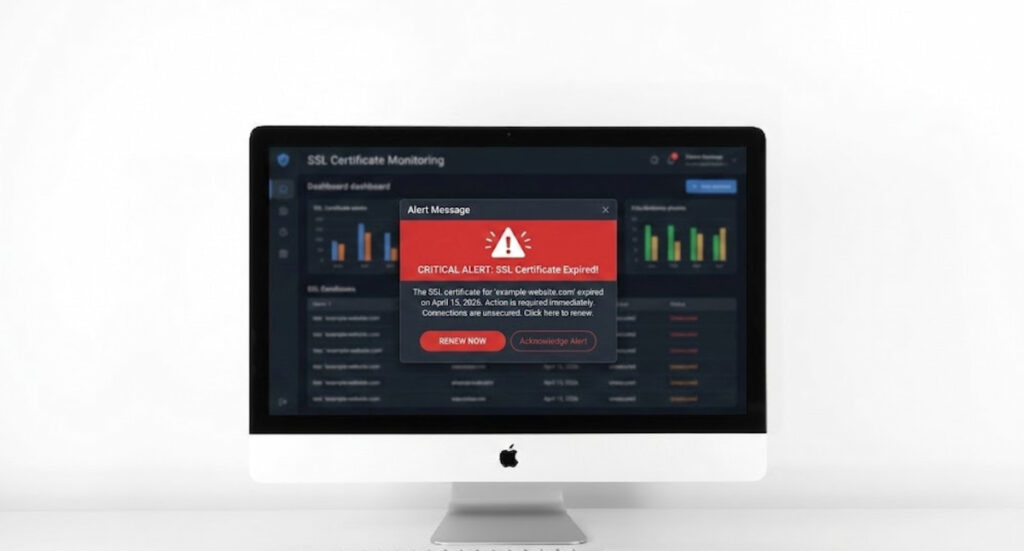
Start with expiry alerts at multiple intervals. Don’t just set one 30 day warning and call it done. Set a 60 day notice for planning. A 30 day notice for action. A 14 day notice for urgency. A 7 day notice for panic mode. And a 1 day notice for the truly forgetful. Different teams work at different speeds. A 30 day warning to a busy DevOps engineer is the same as no warning at all.
Network Monitoring
Monitor from outside your network. Internal checks are fine, but they miss CDN issues, firewall rules, and regional DNS weirdness. Use at least two external monitoring points, ideally in different cloud regions or providers.
If one says the certificate is fine and the other says it’s expired, you’ve got a propagation or caching problem, not a certificate problem. That distinction saves hours of debugging.
Automate Renewal
Automate renewal wherever possible. Let’s Encrypt with certbot or acme.sh can renew certificates without human intervention. Set up a cron job or scheduled task to run renewal checks daily.
For paid certificates, use your vendor’s API to trigger renewal and installation. The goal is to remove the human from the loop. Humans forget, humans go on vacation, humans accidentally revoke the wrong certificate at 3 AM. Automation doesn’t.
Save the List of Certificates
Keep a master list of every certificate. That includes wildcards, internal CA certs, certificates on load balancers, and certificates on appliances like firewalls or VPN concentrators. Spreadsheets work for small environments.
For anything larger, use a configuration management database or a dedicated SSL tracker. Review that list quarterly. Certificates have a way of multiplying when nobody’s looking.
Testing Certificate Revocation
Test revocation checking. Most monitoring tools ignore OCSP and CRL because those endpoints add latency and complexity. But if you don’t test them, you won’t know they’re broken until a certificate actually needs revocation. Run a manual test once a month. Temporarily revoke a test certificate and see if your monitoring catches it within an hour. If not, fix your revocation checking logic.
Document your escalation path. When an alert fires, who gets the first notification? Who gets the second if nobody responds? What’s the out of bands contact method, like phone or SMS, for after hours emergencies? Without this, a 14 day warning is just noise. People will ignore it, and you’ll still end up with an expired certificate at the worst possible moment.
Finally, review your monitoring rules every six months. Maybe your tolerance for expiry has changed, maybe you need shorter intervals for business critical domains, maybe you’ve acquired a new subdomain that nobody added to the monitor list. SSL certificate monitoring isn’t a set it and forget it task. It’s a living process. Treat it that way, and your padlock will stay green. Ignore it, and you’ll learn some very painful lessons about how many customers actually notice that browser warning. Spoiler: it’s almost all of them.

