
You can run tests all day in a lab. But your users? They live out there in the wild. That’s the real battle. One approach fakes the traffic to catch problems before anyone shows up. The other sits quietly, watching what real people actually do. Both matter. Mixing them up is a fast way to waste your budget and chase the wrong alerts. Let’s settle this. Synthetic monitoring vs real user monitoring isn’t about picking a winner. It’s about timing.
Synthetic Monitoring Definition
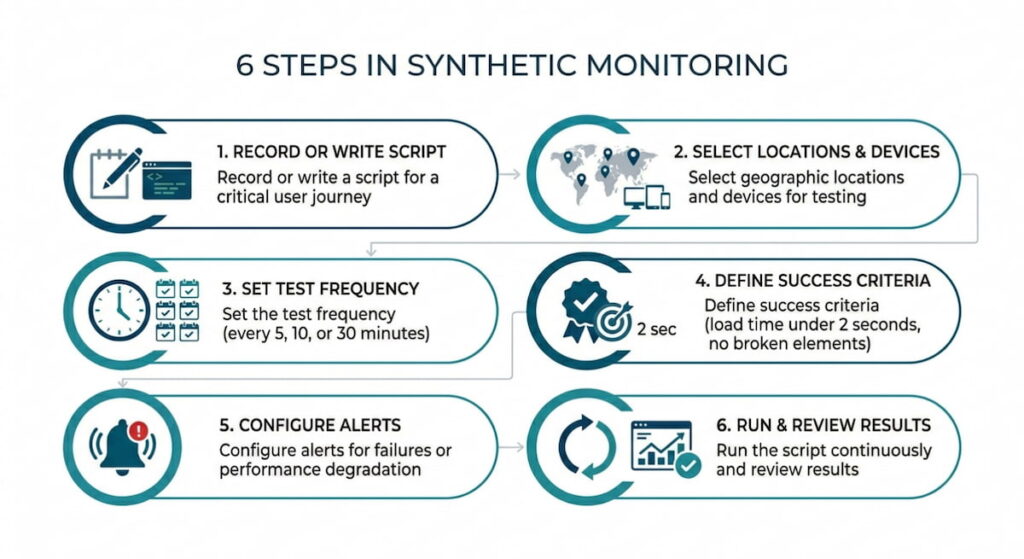
Synthetic monitoring runs scripted transactions. These are fake user journeys. You tell a bot to click here, type there, and submit a form. It repeats those steps every five minutes, maybe fifteen. The bot runs from a browser in a data center, or from phones in different cities. The point is to see if things break before a human notices. This approach is proactive, like a fire drill. You don’t wait for smoke. You light a match on purpose and watch the sprinklers.
Think of synthetic monitoring as your night watchman. The work is boring and repetitive, but honest. Your bot won’t get distracted. It won’t skip steps. It just pounds the same path over and over until something cracks. No opinions. No “maybe the button was a little slow.” Just green or red. Pass or fail.
Key Characteristics of Synthetic Monitoring
- Runs on a fixed schedule (every 5, 15, or 60 minutes);
- Uses real browsers but controlled environments;
- Tests specific user journeys you define in advance;
- Generates alerts the moment a test fails;
- Works even when your site has zero real visitors.
Real User Monitoring (RUM) Definition
Real User Monitoring is different. It doesn’t fake anything. Instead, it watches your actual visitors. Their browsers, their phones, their grandma’s old tablet. Every click, every slow image load, every frustrated refresh. RUM collects data from people who don’t even know they’re being watched. The method is passive. You drop a small script on your pages, and it records performance as it happens.
There is no simulation and no pretending. This is the truth. Ugly, slow, wonderful truth. You see load times from rural Kansas. From a train in Tokyo. From someone on 3G who has twelve tabs open. Synthetic monitoring can’t give you that kind of detail. RUM shows you the world as it is, not as you wish it was.
Key Characteristics of RUM
- Collects data from every page load automatically;
- Requires no predefined scripts or test scenarios;
- Shows real device types, browsers, and network conditions;
- Cannot alert on complete site downtime (no visitors = no data);
- Provides percentiles like P95 and P99 for real traffic patterns.
How Synthetic Monitoring Works
You write a script, or you click together a recording in a tool like Catchpoint, Datadog, or New Relic. That script mimics a user: go to homepage, search for “red shoes,” click the third result, add to cart, start checkout. You can stop there, or go all the way to “pay now” with fake credit card details.
Then you pick locations. Cloud providers run these scripts from real browsers, usually Chrome and sometimes Firefox. The script runs on a schedule. Every five minutes or every hour. It measures several things: How long is the first byte? How long until the page is interactive? Did the image load? Did the button appear?
If something fails, you get an alert within seconds. That happens before any customer screams on Twitter. That’s the magic. You catch the outage at 3 AM when your team is asleep, or when your developer just pushed bad code and hasn’t finished his coffee yet.
But here’s the catch. Synthetic monitoring only knows what you tell it to check. If you script the login flow but ignore the search page, you’ll never know the search function broke. The approach is narrow, deliberately narrow. That’s fine, as long as you remember the limits.
How Real User Monitoring Works
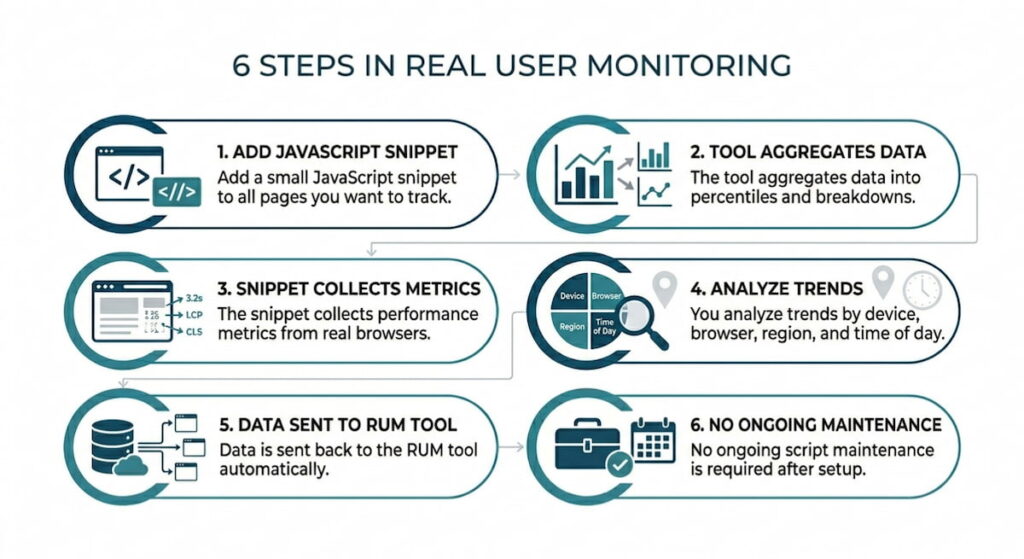
You add a small JavaScript snippet to every page you care about. The snippet loads in your visitor’s browser. It quietly reports back: page URL, time to first paint, time to interact, network info, and maybe the user’s rough location. No passwords and no credit cards. Just performance stats.
The tool aggregates this data. Thousands of visits become percentiles. P95 load time. P99. You see the slowest five percent of your users, the ones who matter most because they’re the ones leaving. The fast users don’t need your sympathy.
RUM also breaks down performance by device, browser, and region. You might discover: “Oh. Chrome on Mac is fine. But Chrome on Windows with a touchscreen is a disaster.” Or “India is twice as slow as Germany.” This is real data with real surprises.
When browser-specific issues appear in monitoring data, it’s often worth investigating whether the problem is caused by the website or the user’s setup. For example, teams testing on macOS sometimes connect multiple displays to reproduce reported issues or expand their debugging workspace. Knowing how to use MacBook as a monitor can be helpful in these scenarios, allowing developers to create a more flexible testing environment while verifying how pages behave across different screen configurations and devices.
You cannot trigger RUM. It just sits there, soaking up information. That means no alert when your site goes down, because if the site is down, nobody visits. No data arrives. So RUM won’t wake you at 3 AM. Instead, it will tell you the next morning, “Hey, from 2 to 4 AM, the fifty people who did manage to load your site had a terrible time.” It’s a different beast entirely.
When to Use Synthetic Monitoring
Use synthetic monitoring when you need to know about downtime before your users do. Focus on critical paths like login, search, checkout, and payment API. Anywhere a five minute outage costs real money. Synthetic monitoring will catch that problem and scream at you the second the button stops working.
Also use synthetic monitoring before a big launch. You are releasing a new feature on Monday. Run synthetic tests from six cities over the weekend. Beat the hell out of the system. Find the slow queries, the broken redirects, the images that take eight seconds. Fix these issues before your customers see anything.
A third use case involves third party dependencies. You use a CDN, an ad network, or a chatbot widget. Synthetic monitoring can watch those too. If the ad network goes down, synthetic shows you that the page still loads but the widget is dead. You can prove it’s not your fault. That’s useful when the business team comes asking questions.
We think synthetic monitoring is also great for SLAs. You promised 99.9% uptime on the search page. Synthetic gives you hard numbers measured the same way every time. No excuses.
Best Use Cases for Synthetic Monitoring
- Pre-deployment testing in staging environments;
- Monitoring critical business flows (login, checkout, payment);
- Tracking third party API and CDN performance;
- Alerting on downtime during low traffic hours;
- Verifying SLAs with consistent, repeatable measurements;
- Testing from specific geographic locations you care about.
When to Use Real User Monitoring
Real User Monitoring shines when you care about actual experience, not lab conditions. Real devices, real networks, real human frustration. If your users are on old Android phones in rural areas, synthetic monitoring won’t tell you that story. RUM will.
Use RUM to find bottlenecks that only appear under load. A synthetic test runs alone with no other traffic. But your real site gets hundreds or thousands of concurrent users. Database connection pools fill up. Caches expire in weird ways. RUM catches those slowdowns because they happen inside real traffic.
Also use RUM after you fix something. You deployed a performance fix. Synthetic says “looks good.” But do real users agree? RUM tells you. The 95th percentile dropped by 200ms. That’s proof. That’s your raise, maybe.
One more thing. RUM helps you prioritize. You have ten things to optimize. RUM shows you which pages actually get traffic and which browsers your real audience uses. Fix the stuff that matters. Don’t waste Tuesday afternoon speeding up a page that nobody visits.
Honestly, without RUM you are flying blind. Synthetic gives you a map. RUM gives you the potholes.
Best Use Cases for Real User Monitoring
- Understanding actual user device and browser diversity;
- Finding performance bottlenecks under real traffic load;
- Prioritizing optimization work based on real usage patterns;
- Verifying that fixes actually helped real people;
- Tracking long term performance trends by region;
- Measuring business impact of slow pages on conversion rates.
Synthetic Monitoring vs Real User Monitoring: Key Differences
Here is where people get lost. They think one approach is better than the other. That’s wrong. These tools answer different questions. Synthetic asks: “Can a user do this?” RUM asks: “How are users actually doing?”
Synthetic monitoring is predictable. You control the test with the same path, same machine, same network. That is both a feature and a bug. You don’t see the chaos of real life, like ad blockers, slow extensions, or a user who clicks back and forth like a caffeinated squirrel.
RUM is chaotic. That’s the point. You see everything, but you cannot replay a specific user session. You also cannot alert on downtime because no traffic equals no data.
Another difference is volume. Synthetic runs maybe 10,000 tests per day. RUM tracks millions of real visits. However, synthetic gives you detailed traces including every network call and every byte. RUM gives you statistics but rarely the full waterfall for a single user unless you sample heavily.
Geography matters too. Synthetic lets you pick specific cities for testing. RUM just shows you where your users actually live. If nobody visits from South Africa, RUM won’t tell you how your site performs there. Synthetic will, if you pay for that location.
Comparison Table: Synthetic vs. RUM
| Feature | Synthetic Monitoring | Real User Monitoring (RUM) |
|---|---|---|
| Data source | Simulated, scripted traffic | Actual visitor traffic |
| Alert on downtime | Yes, immediately | No, needs traffic |
| Geographic control | Fixed test locations | Wherever users come from |
| Traffic volume | Low, predictable | High, bursty |
| Debugging detail | Full waterfall, every request | Aggregated stats, sometimes samples |
| Catches CDN issues | Yes | Only if users hit that CDN |
| Works before launch | Yes | No, because no users exist yet |
| Shows real device diversity | No | Yes, absolutely |
| Cost model | Per test or per location | Per session or per month |
See? Different tools for different jobs. You wouldn’t use a hammer to check the oil. The same principle applies here.
How to Combine Synthetic and RUM Monitoring
This is a smart play. Don’t choose one. Combine both.
Set synthetic monitoring to watch your critical paths including login, search, checkout, and password reset. Run tests from five locations every five minutes. Alert when response time exceeds two seconds or when any step fails. That is your early warning system. You will know about problems before your boss hears from a customer.
Then run RUM on everything else, meaning all pages and all users. Watch the 95th percentile. When RUM shows a slow region or a slow browser version, write a synthetic script to test that exact scenario. Reproduce the problem. Fix it. Then verify with synthetic that the fix actually holds.
Use synthetic monitoring to test your staging environment. Before you deploy to production, run synthetic against staging. Catch the big stuff early. After deployment, compare synthetic results from production against RUM data from the last hour. If synthetic says “fast” but RUM says “slow,” something is weird. Maybe caching. Maybe geographic routing. Investigate.
We think the real power is in the handoff. Synthetic catches the outage. You fix it. RUM confirms the fix actually helped real people. That loop is where you win.
One more trick. Use synthetic monitoring to baseline your fastest possible experience. Run it from a top tier data center with a fat pipe. That is your theoretical best. Then use RUM to measure the gap between that baseline and what real users get. That gap is your optimization opportunity. Close it, and you become a hero.
Don’t overcomplicate things though. Start with synthetic on three critical paths. Add RUM on your top ten pages. See what shakes out. You will learn more in two weeks than in two years of guessing.
Practical Steps to Combine Both Approaches
- Set up synthetic tests on your login, search, checkout;
- Deploy RUM across all pages to collect real visitor data;
- Use synthetic alerts to catch downtime before users complain;
- Use RUM to identify slow regions or device types;
- Write new synthetic scripts to reproduce RUM findings;
- Fix the root cause and verify with both tools;
- Repeat the cycle weekly for continuous improvement.
Common Mistakes to Avoid
- Using only synthetic monitoring and ignoring real user conditions;
- Relying only on RUM and missing downtime alerts;
- Testing non critical paths with synthetic while ignoring the checkout flow;
- Looking at average load times instead of P95 or P99 in RUM;
- Running synthetic tests from only one geographic location;
- Forgetting to update synthetic scripts when your website changes.

