
A website goes down. Maybe it’s three in the morning. The sales team wakes up to a flood of emails. Angry customers can’t check out. This scenario plays out thousands of times a day across the internet. Availability monitoring is the practice that stops that chaos before it starts. It’s the digital watchdog that tells you — instantly — when your site, app, or server stops responding. For any business operating online, this isn’t just technical. It’s financial. Your reputation rides on a single status code.
What is Availability Monitoring
Let’s strip away the jargon. Availability monitoring is simply the automated process of testing a website, API, or network endpoint to confirm it is up and reachable. You set a tool to ping your server at regular intervals. Every minute. Every five minutes. The tool records the response. Was it fast? Did it return an error? Did it time out completely?
We think of it as the pulse check for your infrastructure. If your site goes offline, availability monitoring doesn’t guess. It knows. Within seconds, alerts fire off to Slack, email, or your phone. But it’s more than just an “is it up?” question. Good availability monitoring tracks how it is up. Is the homepage loading in 200 milliseconds or 20 seconds? A slow site might as well be down.
53% of mobile users abandon sites taking longer than 3 seconds to load. So, availability monitoring must catch performance degradation before a full outage happens. It’s proactive. It’s relentless. And it’s the foundation of any serious infrastructure strategy.
How Availability Monitoring Works
The mechanics are surprisingly simple, though the scale can get complex. You deploy a monitoring agent. Or, more commonly, you use a cloud-based service that pings your application from multiple locations around the world.
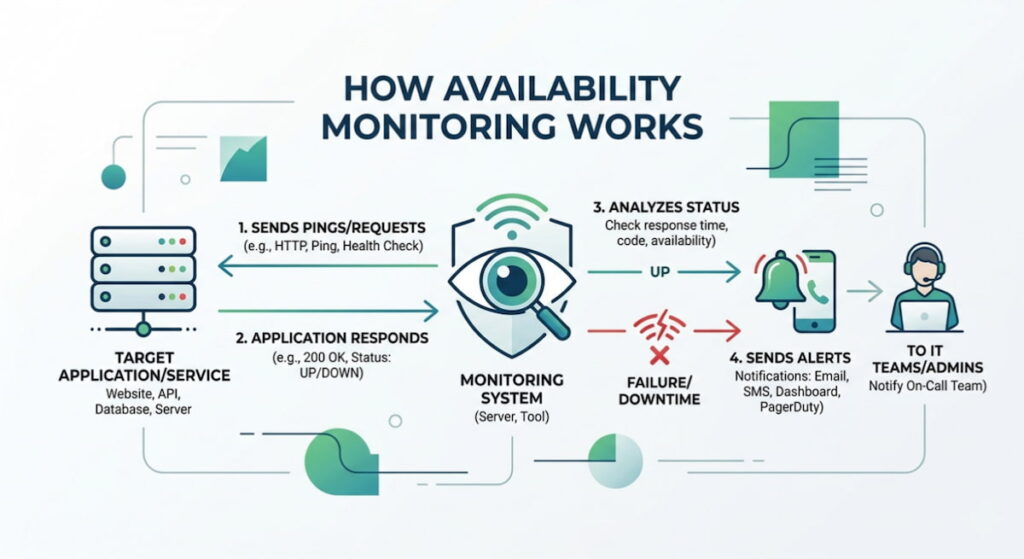
Here’s the basic workflow:
- Synthetic Requests: The monitor performs a simulated user action. This could be an HTTP GET request to your homepage. It might be a POST request to a login endpoint. The goal is to act like a real browser;
- Interval Setting: You define the frequency. Every 30 seconds? Every minute? Shorter intervals catch issues faster but generate more data;
- Response Analysis: The monitor checks the returned status code. A 200 OK is success. A 500 Internal Server Error is an immediate flag. A timeout — meaning no response at all — triggers an alert;
- Multi-Location Verification: Here’s where it gets clever. A single failed ping from one location might just be a local internet hiccup. But if monitors in New York, London, and Tokyo all fail simultaneously? That’s a real outage. Most modern systems use distributed checkpoints to eliminate false positives.
Protocols and Checks
Availability monitoring isn’t limited to HTTP. You can monitor:
- ICMP Ping: The classic check. It just sees if the server is alive on the network;
- TCP Port Checks: Verifies that specific ports (like 443 for HTTPS or 22 for SSH) are open and accepting connections;
- SSL Certificate Expiry: A certificate expired means a site that refuses visitors. Monitoring catches this week in advance;
- DNS Resolution: If your domain name fails to resolve to an IP address, nobody gets in.
These checks run constantly. When a failure occurs, the system doesn’t just scream “fire.” It collects evidence. It notes the time, the response time, and the error type. This data becomes invaluable when your engineering team starts the post-mortem.
Benefits of Availability Monitoring
Why invest the time? The answer sits in the balance sheet. But let’s look at the less obvious perks.
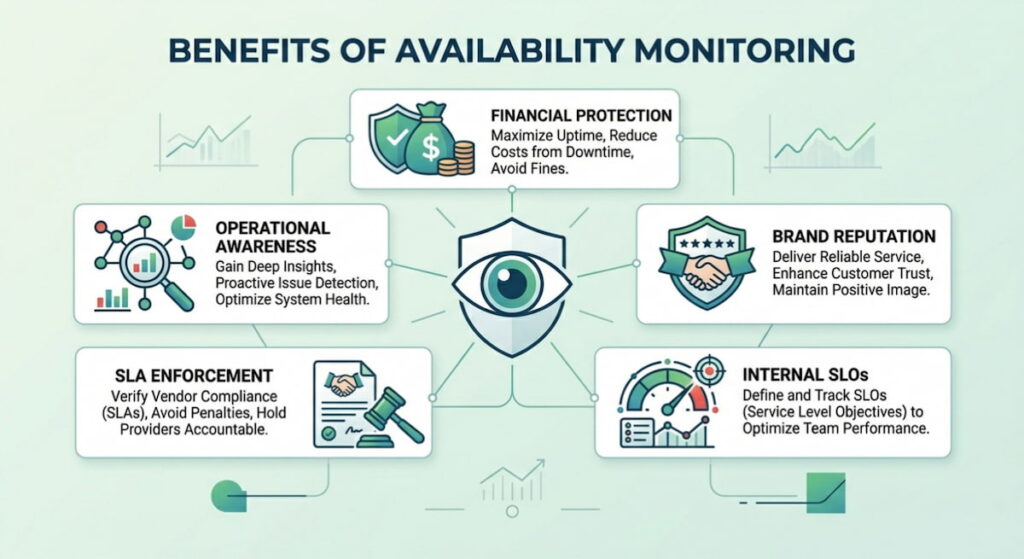
Financial Protection
Downtime costs money. For an e-commerce site, even ten minutes offline during a sale can mean thousands in lost revenue. Availability monitoring acts as insurance. It reduces the Mean Time to Detection (MTTD) from hours to seconds. The faster you know, the faster you fix.
Brand Reputation
Trust is fragile. Customers who encounter a broken site often don’t come back. They assume incompetence. They switch to a competitor. Monitoring helps you maintain the “always on” image that consumers expect.
Operational Awareness
You can’t fix what you don’t measure. Monitoring reveals patterns. Maybe your site crashes every Tuesday at 2 PM when a specific cron job runs. Without monitoring, that’s a mystery. With it, it’s a fix waiting to happen.
SLA Enforcement
If you use third-party services or cloud providers, availability monitoring gives you proof. Did AWS have an outage? You have the data. Did your SaaS provider drop below their 99.9% SLA? You have the logs to demand credits. It holds vendors accountable.
Internal SLOs
Engineering teams need targets. Service Level Objectives (SLOs) based on availability data give developers a clear goal. 99.95% uptime. It’s concrete. It’s measurable. It drives better coding practices.
How Monitoring Systems Ensure High Availability
High availability is the goal. Five nines (99.999% uptime). It sounds great. Getting there requires architecture. Monitoring systems are the feedback loop for that architecture.
You can’t achieve high availability without knowing where the weak points are. Monitoring systems create a map. They show the health of load balancers, application servers, and databases in one view.
Redundancy and Failover
Monitoring systems often integrate directly with orchestration tools like Kubernetes or cloud auto-scaling groups. When a monitor detects a failing instance, it can trigger an automated action. Replace the node. Restart the service. Route traffic away from the failing region.
This turns monitoring from a passive alerting tool into an active remediation engine.
Geographic Distribution
High availability relies on being everywhere. If a data center in Virginia goes dark, traffic shifts to Oregon or Ireland. But how do you know the failover worked? Global availability monitoring confirms it. By pinging your endpoints from different continents, you verify that your global load balancing is actually routing users correctly.
A common mistake is only monitoring from within your own data center. That’s like asking a security guard if the building is secure. You need outside perspectives. You need monitors that sit in the real world, where your users live.
Common Challenges of Availability Monitoring
It’s not all green checkmarks and clean dashboards. Availability monitoring comes with friction.
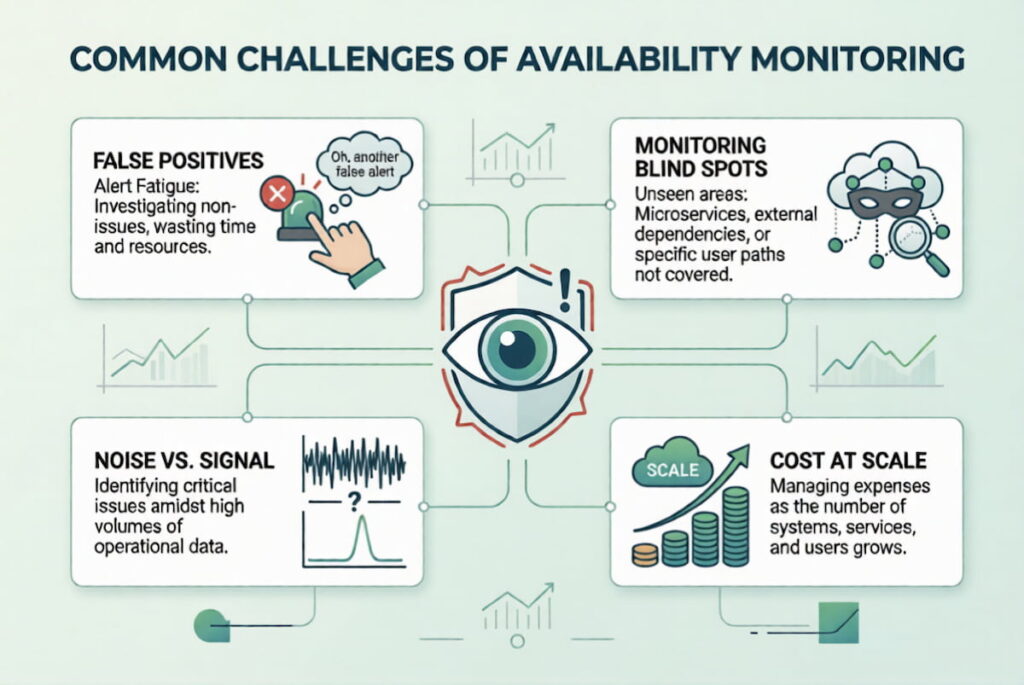
False Positives
Nothing destroys trust in a monitoring system faster than waking up at 2 AM for a non-issue. A brief network blip. A monitor that was misconfigured. A maintenance window you forgot to silence. False positives cause alert fatigue. Engineers start ignoring the system. Then a real outage hits, and nobody responds.
Monitoring Blind Spots
You monitor the homepage. Great. But what about the search function? What about the checkout API? What about the login flow? If you only monitor the front door, a fire in the kitchen can burn the whole place down while your dashboard shows a perfect 200 OK.
Noise vs. Signal
Setting up a monitor is easy. Setting up the right alerts is hard. You need thresholds. A single slow request shouldn’t wake the CEO. But 500 slow requests in a minute? That’s a problem. The challenge is tuning the sensitivity so you get alerts for real incidents, not statistical anomalies.
Cost at Scale
For a small blog, monitoring is cheap. For a multinational platform with thousands of microservices, it gets expensive. Monitoring every endpoint, from every location, at 30-second intervals, generates terabytes of data. You have to balance visibility against budget.
How to Choose Availability Monitor in 6 Steps
The market is flooded. Pingdom, UptimeRobot, Datadog, New Relic, Checkly. The list goes on. Choosing the wrong one wastes money and leaves you exposed. We think the decision comes down to a few specific criteria.
Step 1: Check Frequency
Can it check every minute? Every 10 seconds? For a high-traffic e-commerce site, five-minute intervals are too slow. You need granular data. For a static brochure site, every five minutes is probably fine. Match the interval to the business impact;
Step 2: Global Locations
A service with 10 global locations is better than one with 2. You want to see how your site performs in São Paulo, Sydney, and Frankfurt — especially if your users are there;
Step 3: Alerting Integrations
Does it send alerts to PagerDuty? Opsgenie? Slack? Email alone is often insufficient. You need routing. You need escalation policies. If the on-call engineer doesn’t answer in five minutes, the alert should move to the next person;
Step 4: Protocol Support
Don’t assume HTTP is enough. If you run a database cluster, you need TCP port checks. If you run APIs, you need SSL certificate monitoring. Ensure the tool covers your entire stack, not just the web server;
Step 5: Synthetic Testing Capabilities
Basic monitoring pings a URL. Advanced monitoring executes a script. It clicks buttons. It logs in. It fills out forms. This “synthetic transaction” monitoring simulates a real user journey. It’s the only way to know if your entire application — not just the server — is functioning.
Step 6: Pricing Structure
Look at the pricing model. Per-check pricing gets expensive fast. Per-host pricing is often simpler. Also, watch for data retention limits. If the tool only stores 7 days of history, it’s hard to spot monthly trends.
FAQ
Monitoring starts with a few simple options. Grab a free or low cost SaaS tool like UptimeRobot or StatusCake, sign up, plug in your website URL, and set the check interval to five minutes. Configure alerts via email or SMS, and honestly, that’s it. Simple. But a simple uptime check from one location maybe gives you a false sense of security.
We think for more complex setups, you’ll want a dedicated application performance monitoring tool, an APM. These let you monitor not just if the site is up, but the performance of individual backend services, a much deeper technical view. Monitor from multiple geographic regions. Seriously. One location won’t cut it.
There is no single “best” solution, as it all depends entirely on your needs. Freelancers and small blogs should consider UptimeRobot or Freshping—tools that offer generous free plans and a simple interface. For SaaS services and e-commerce, Checkly or Pingdom are suitable, offering reliable API monitoring and synthetic transaction testing capabilities—that’s a whole different level. Large enterprises and cloud solutions?
Datadog or New Relic integrate deeply with your infrastructure stack, providing correlation between availability metrics and server metrics such as CPU usage or memory leaks. We believe that most companies start with simple solutions and then move to more complex APM platforms as their infrastructure grows in complexity. Honestly, the best approach is to try out two or three services. Run them in parallel for a week. See which one detects issues the fastest. See which interface your team actually wants to use.
There is no single “best” solution, as it all depends entirely on your needs. Freelancers and small blogs should consider UptimeRobot or Freshping—tools that offer generous free plans and a simple interface. For SaaS services and e-commerce, Checkly or Pingdom are suitable, offering reliable API monitoring and synthetic transaction testing capabilities—that’s a whole different level.
Large enterprises and cloud solutions? Datadog or New Relic integrate deeply with your infrastructure stack, providing correlation between availability metrics and server metrics such as CPU usage or memory leaks. We believe that most companies start with simple solutions and then move to more complex APM platforms as their infrastructure grows in complexity. Honestly, the best approach is to try out two or three services. Run them in parallel for a week. See which one detects issues the fastest. See which interface your team actually wants to use.

